Galaxy Buds On: Open-Ear Features and Fit Explained
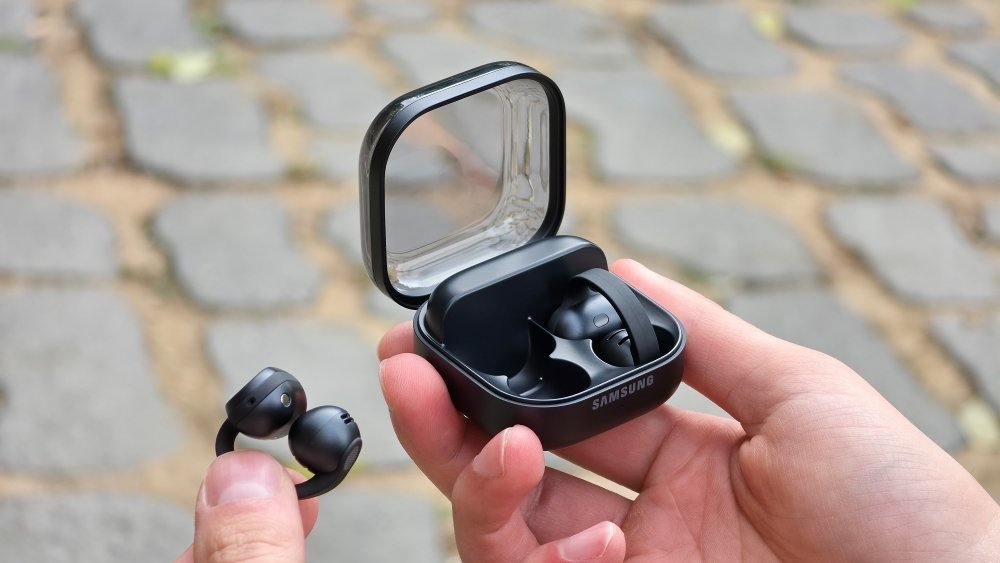
Galaxy Buds On open ear features are the focus of Samsung’s 27 October 2026 product story. The earbuds use a clip-on design, making them a different proposition from an earbud that seals the ear canal. The practical question is whether that design suits where you listen, how you take calls and which phone features you expect to use.
What Samsung describes
In its Galaxy Buds On product feature article, Samsung calls these its first open-ear earbuds. Announced features include voice controls, head gestures for calls and notifications, Gemini Live access with a compatible Galaxy AI-enabled phone, and Quick Voice Memo.
Samsung says Quick Voice Memo requires the Samsung Voice Recorder and Bixby apps on a Galaxy AI-enabled device, with the relevant gesture configured in settings. It also acknowledges that sound leakage can vary with volume, ear shape and environment.
The article is Samsung’s own hands-on presentation. Bootpoot has not independently tested comfort, call quality, leakage or battery endurance, so those manufacturer descriptions should remain distinct from review findings.
Open-ear listening changes the trade-offs
An open-ear design leaves you with a different listening experience from a sealed fit. Before buying, think about your actual surroundings: a quiet room, a shared office and a noisy commute present different demands.
Do not assume a design that keeps the ears open guarantees awareness or safety. Volume, attention and the surrounding situation still matter. Use particular care around roads and other places where hearing alone is not enough to judge risk.
If your main aim is blocking out noise, compare that goal directly with the product’s design. If your main aim is avoiding the feel of an in-ear tip, a clip-on demonstration may be more informative than reading a long specification list.
Comfort needs a personal test
Ear shape varies, and a promotional statement about comfort cannot predict your experience. If a demonstration is available, wear the earbuds for more than a brief photograph and move your head naturally.
Notice pressure, stability and whether controls are easy to use without shifting the earbud. If you wear spectacles, check how the two products sit together. A good fit for one reviewer may not be a good fit for you.
Read the seller’s return conditions before purchasing. Hygiene-related restrictions can make trying earbuds after an online order different from trying a speaker or a keyboard.
Check connected features before paying
Make a list of the features you actually want: music controls, call handling, voice notes or an assistant. Then verify which work with your exact phone and installed apps.
A Bluetooth connection alone should not be taken as proof that every promoted AI function will be available. Compatibility, accounts, app versions and regional support can all matter.
For voice notes, test where recordings appear and whether you can find and delete them easily. A convenient capture shortcut is only useful if the later retrieval process fits your routine. At work, also check whether recording is permitted in the situation where you intend to use it.
How to judge a future review
Look for call samples from more than one setting, clear explanations of volume and leakage testing, and comfort observations over a stated period. A single short clip cannot represent every noisy environment.
Battery testing should identify which features were active and what listening volume was used. Without that context, comparing two headline endurance numbers can be misleading.
This guide does not establish an Indian retail price or local launch date. Check Samsung’s regional listing and warranty details rather than treating a global article as a local sales announcement.
Galaxy Buds On are worth considering through fit, listening environment and supported phone functions. For another recent wearable where compatibility comes first, see our Fitbit Edge feature and phone guide.